
Batch Milestone Timeline That Shows Progress Fast
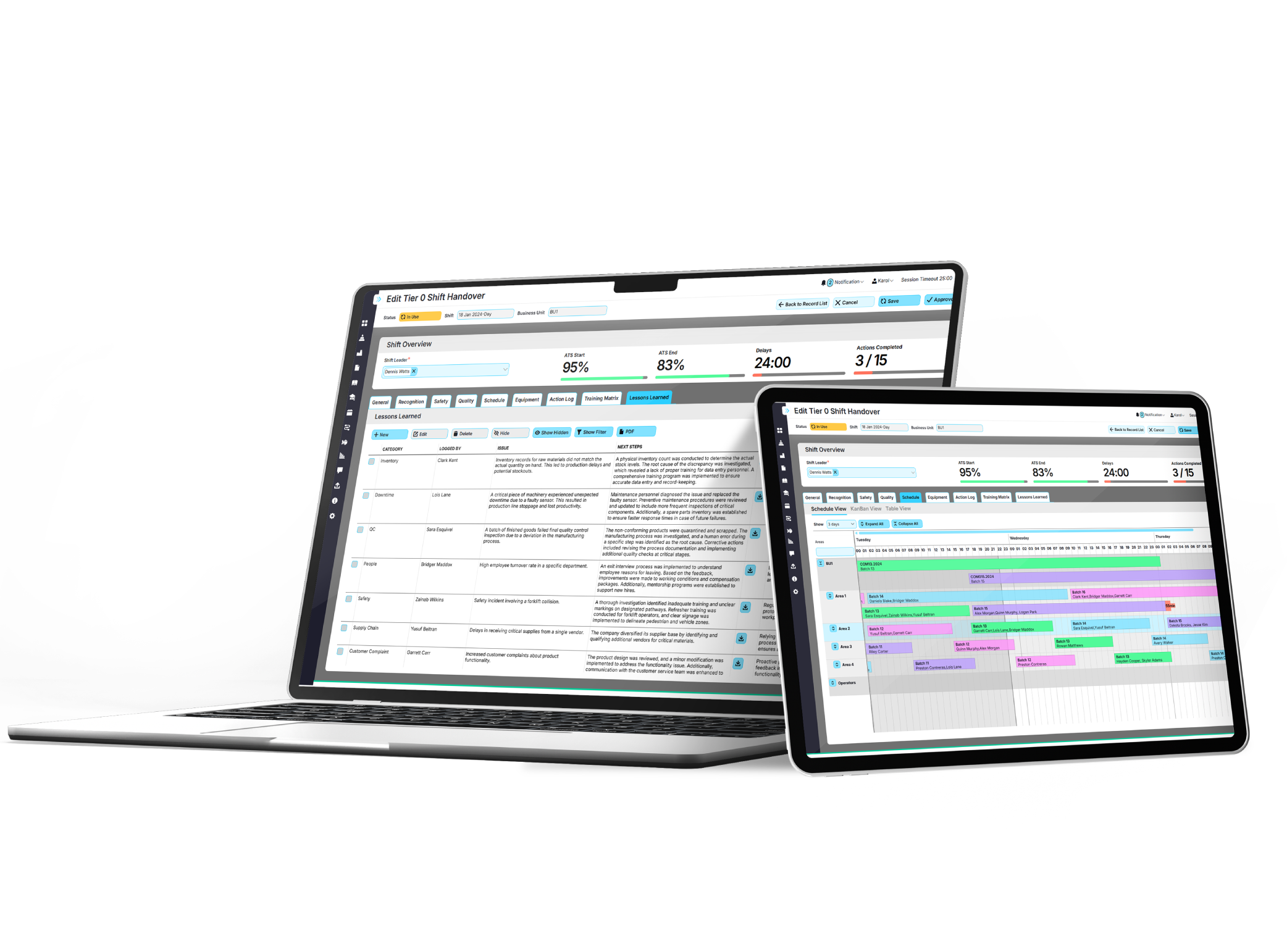
EviView’s batch milestone timeline lets you see how production batches are moving through every step of the process. Teams know exactly what’s complete, what’s still in progress, and where delays might pop up. No spreadsheets, just clear timelines that help keep work on track.


What Batch Milestone Timeline Looks Like in EviView
Batch milestone timeline fits right into daily work so teams always know how each batch is moving through key steps. Updates happen in real time so you can catch problems early and help keep production running smoothly from start to finish.
- See every milestone for each batch on one screen
- Track progress live as batches move through production
- Spot delays quickly and resolve them before they grow
- Connect timelines to quality checks, documents, and approvals
What You Gain From Real-Time Batch Tracking
Batch milestone timeline in EviView keeps everyone on the same page. Supervisors and teams can look at one screen and know exactly where each batch stands, what work is finished, and what is next. If something slows down, it’s easy to see and fix. This helps avoid surprises, keep schedules on target, and reduce stress across shifts. It also builds confidence during audits or customer updates. EviView makes tracking simple and turns the entire process into a clear timeline everyone can rely on.
Stay Ahead of Delays
Spot slowdowns before they turn into big problems and keep batches moving without interruptions.
Keep Teams In Sync
Help everyone stay on the same page, understand priorities, and know exactly what needs to happen next.
Improve Communication Across Shifts
Ensure important details are shared clearly between shifts so nothing gets missed and work stays consistent.
Make Better Decisions With Clear Data
Use real-time timelines and updates to choose the right actions and keep production on track every day.
Built to Work With Your Operational Systems
EviView’s batch milestone timeline connects smoothly with your current tools like MES, ERP, QMS, and production systems. Updates flow into your existing reports so there’s no extra data entry and no gaps in your process. Teams get dependable data, easier reporting, and a better view of production without having to change how they work every day.
How Teams Use Batch Milestone Timeline
Teams across many industries use EviView to keep production moving without surprises. Mobile access, clear timelines, and real-time updates help supervisors and operators stay aligned and avoid delays.
Here’s how real teams keep production running on time and without guesswork.

Merck
EviView’s Digital Daily Management System has been transformative for Merck. By streamlining shift handovers, centralizing data, and integrating with SAP and Palantir Data Lake, we’ve reduced downtime by 30% and saved €66,000 annually. The system has boosted visibility, improved communication, and increased safety incident reporting by 300%, fostering a culture of continuous improvement and positioning us for long-term success.

Pharmaceutical Company, US
Head of Digitalisation and Strategy
Electronic Handover
I worked with EviView on an electronic handover project. Their team was very knowledgeable, took time to ensure all stakeholders were kept up to date with the progress of the project, and was always available to give advice on system usage during implementation.
Bio-Pharma Company, US
Manufacturing Team Lead
Top 5 Pharma Manufacturer
Karol’s team delivered a highly successful change management and digital transformation project. His structured approach, detailed analysis, and process-driven methodology have been invaluable on every project. EviView’s understanding of business, IT, operations, and budgetary needs is unmatched.

Top 5 Pharma Manufacturer, EU
Senior Manager of Engineering & Maintenance

From Milestones to Confident Production
EviView makes it easy to follow batches from the first step to the last. Every milestone is tracked and visible so teams can see progress and act quickly if something changes. If patterns repeat, there’s a record to help improve the process. This is batch tracking built for real production needs.
Used by Global Leaders















Let's Talk Digital Operations!
Explore how EviView can support your team – from shift handovers to full compliance tracking.